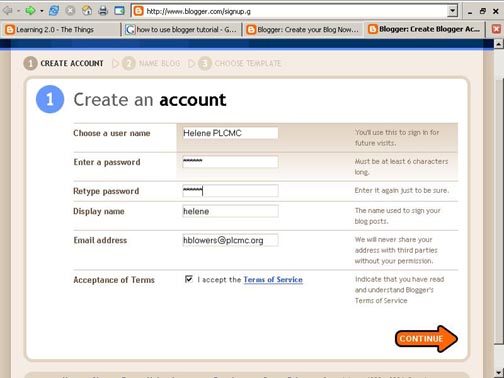
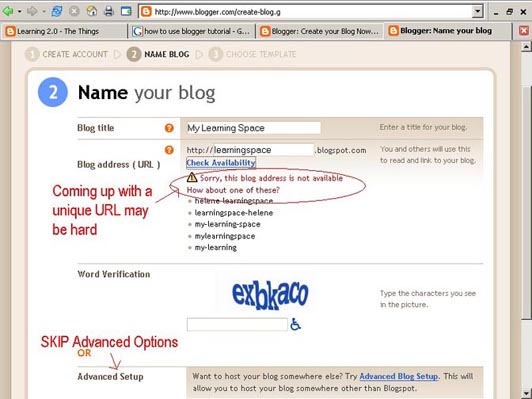
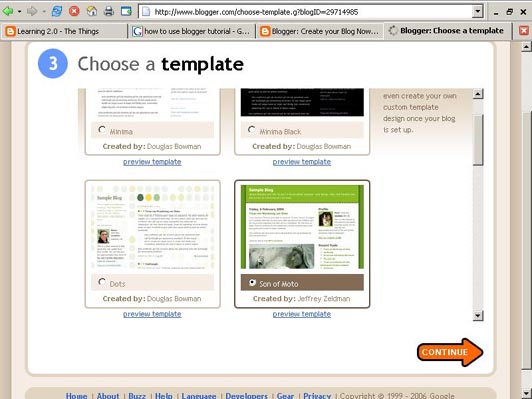
Creating a blog using Blogger takes just three steps:
- Create an account (view screenshot)
- Name your blog (view screenshot)
- Select your template. (view screenshot)
Once you’ve created your blog here are two important things to know:
- To add posts: The maintenance interface that you will use to add posts, edit or change the step-up your blog is accessed online at http://www.blogger.com Be sure to write down your login and password.
- To view your blog: Your blog address is http://(xxxx).blogspot.com, (xxxx)=the unique identifier you entered in Step 2. Be sure to also write down your blog address.
If you run into problems or would like more information about blogs and using Blogger here are some discovery resources you can use:
- Freevlog’s Quicktime Tutorial: Setup a Free Blogger Blog Note: Ignore the opening comments about downloading Firefox if your PC doesn’t have it. This will work in Explorer just fine.
- Blogger’s Quick Tutorial
OK -- Now, it’s your turn...
Discovery Exercise:
- Setup a blog for yourself through Blogger.
- Add a test post or two. Maybe you want to talk about your experience so far.
- Have fun!!!!

No comments:
Post a Comment